Text Annotation
The Text annotation is a free-form label placed on the canvas for notes, titles and callouts. It has no terminals and no logic role, so it never affects simulation. You control its font size, font family (Poppins, monospace or serif), font style (normal, bold, italic, bold-italic) and color from the 24-color design palette. Clear labelling turns a wiring diagram into a document that explains itself, which is the whole point of an annotation.
Labelling part of a circuit
Drop a Text annotation near a group of components and type a short caption such as "Clock domain". The label sits on the canvas and moves with your view but plays no part in the logic. A one-line caption is often enough to remind a future reader what a cluster of gates is for.

Using type to build a hierarchy
Vary font size, weight, style and color to signal importance: a large bold title, a smaller italic subtitle, a colored note, a monospace signal name. This visual hierarchy lets a reader scan the sheet and grasp its structure at a glance, the same way headings organize a written document. Color coding is one of the most effective ways to distinguish categories of information.

Callouts on a schematic
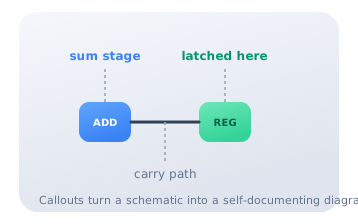
Place short Text callouts next to the stages of a datapath ("sum stage", "carry path", "latched here") to explain what each block does. Well-placed labels attach meaning directly to the geometry of the diagram, so the reader does not have to reverse-engineer the intent from the wiring. A visual notation is only as effective as the extent to which its symbols are explained; annotations close that gap.
Citations
- Moody, D. L. (2009). The "physics" of notations: Toward a scientific basis for constructing visual notations in software engineering. IEEE Transactions on Software Engineering, 35(6), 756-779. Reference 1
- Tufte, E. R. (2001). The visual display of quantitative information (2nd ed.). Graphics Press. Reference 2